AI Scribe for Urgent Care: How to Chart Between Patients Without Falling Behind
On this page
- Why charting falls behind in urgent care
- What the evidence says about AI scribes
- The between-patients workflow
- 1. Start recording when the conversation starts
- 2. Talk through the exam out loud
- 3. Summarize the plan before you leave the room
- 4. Review and sign in the hallway
- 5. Handle interruptions without losing the thread
- Features that matter most in urgent care
- No note caps that run out mid-month
- Fast, mobile capture
- Short, decision-focused templates
- Snippets for the things you say all day
- Coding suggestions and after-visit summaries
- Help from your MAs
- Answers without leaving the chart
- What it looks like in practice
- Rolling out an AI scribe across an urgent care clinic
- Common pitfalls to avoid
- FAQ
- Can an AI scribe keep up with urgent care volume?
- Do I need to tell patients I’m using an AI scribe?
- Does an AI scribe work with my urgent care EHR?
- Can my medical assistants use it too?
- Will an AI scribe code my visits?
- Leave on time tonight
It’s 4 p.m. The waiting room is full, three rooms are turned over, and you have nine open charts. You know how this ends: the last patient leaves at 8, and you’re still charting at 9:30.
Urgent care runs on throughput. Every minute spent typing a note is a minute not spent with the next patient, or a minute added to the end of your shift. AI scribes won’t change the volume, but they can change when the charting happens: between patients, in seconds, instead of after close.
Here’s a practical workflow for using an AI scribe in urgent care, and what to look for in a tool that can keep up.
Why charting falls behind in urgent care
The documentation burden isn’t unique to urgent care, but urgent care feels it acutely.
A widely cited time-and-motion study in the Annals of Internal Medicine found that ambulatory physicians spent just 27% of their office day on direct clinical face time with patients and 49.2% on EHR and desk work. Physicians also reported 1 to 2 hours of after-hours work each night, mostly on the EHR.
Now add urgent care’s specific pressures:
- High volume, short visits. Many quick encounters means many notes, each needing its own HPI, exam, and plan.
- Constant interruptions. You get pulled into another room for a laceration halfway through a visit.
- Unpredictable flow. A quiet morning turns into a packed afternoon, and charts pile up fast.
- Return precautions and coding matter. Notes need to be complete enough to support the visit level and protect you if a patient comes back.
When the charts pile up, the end of shift becomes charting time. Over weeks, that’s how burnout builds.
What the evidence says about AI scribes
AI scribes are new enough that research is still catching up, but the early data is encouraging.
- At The Permanente Medical Group, AI scribes saved an estimated 15,791 hours of documentation time, the equivalent of 1,794 workdays, across 2.5 million encounters in just over a year.
- In another AMA report, physicians using an AI scribe spent about an hour less per day at the keyboard, with emergency physicians among the most enthusiastic adopters.
- A multisite study in JAMA Network Open found that burnout among 263 ambulatory clinicians fell from 51.9% to 38.8% after 30 days of using an ambient AI scribe.
Your results will depend on your workflow, your templates, and your specialty. But the direction is clear: less time typing, more time with patients.
The between-patients workflow
Here’s a simple workflow that helps urgent care clinicians close most notes before the next patient.
1. Start recording when the conversation starts
Open the scribe on your phone or computer and start recording as you walk into the room. Let patients know you’re using an AI scribe to help with notes, following your clinic’s consent policy.
2. Talk through the exam out loud
The scribe documents what it hears. Saying findings out loud makes the note more complete and often helps the patient understand what you’re checking:
- “Lungs are clear bilaterally, no wheezing.”
- “Tender over the ATFL, no bony tenderness, Ottawa rules negative.”
- “Ears look normal, throat is red without exudate.”
3. Summarize the plan before you leave the room
A quick plan summary does double duty. The patient hears it clearly, and the scribe captures a clean plan, including return precautions:
“So this looks like a viral infection. Rest, fluids, and Tylenol or ibuprofen for fever. If you have trouble breathing or the fever lasts more than three more days, come back or go to the ER.”
4. Review and sign in the hallway
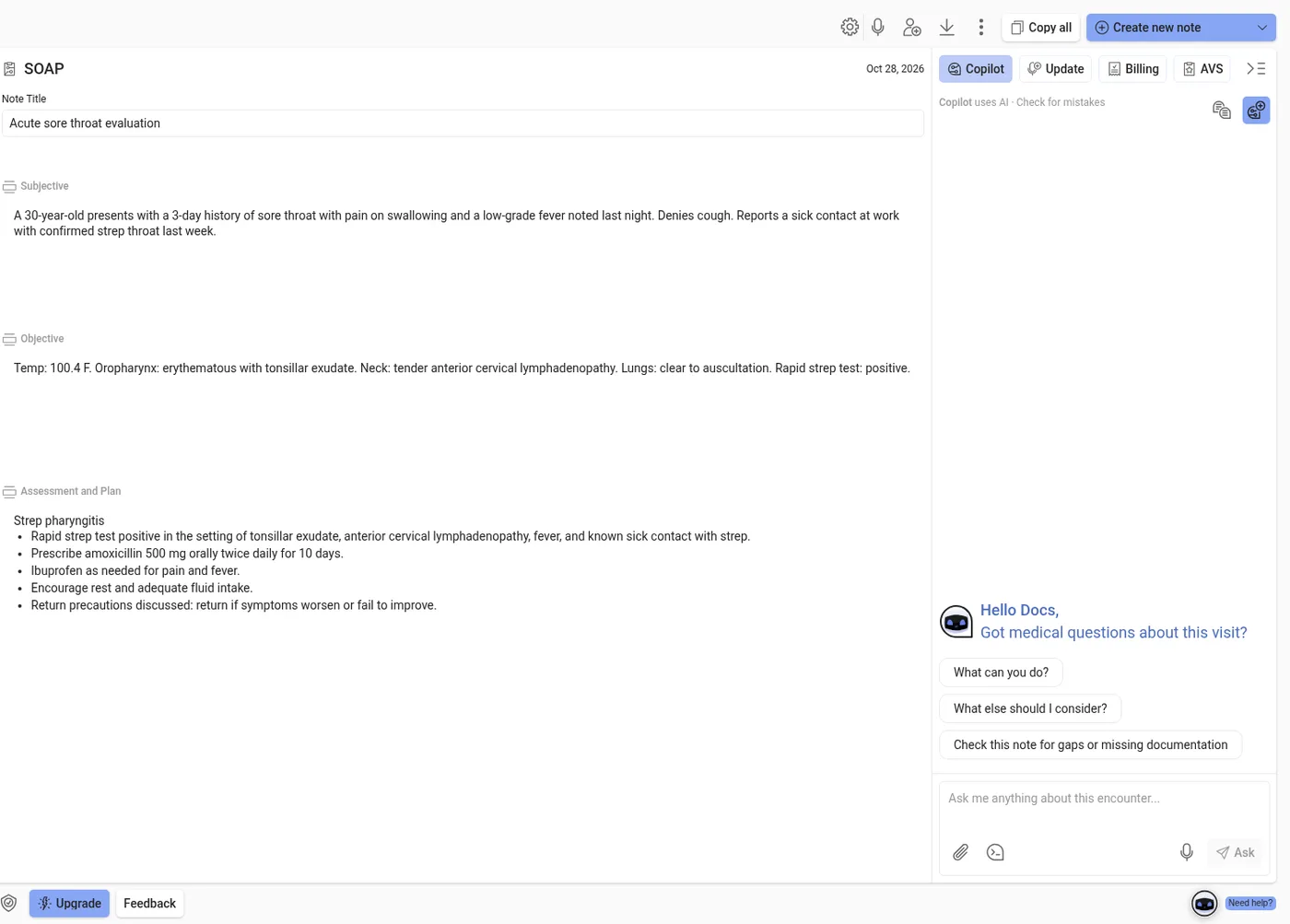
Stop recording. In seconds, you have a structured draft. Skim it for accuracy, fix anything that’s off, and transfer it into your EHR. Many clinicians do this in the minute between rooms.
5. Handle interruptions without losing the thread
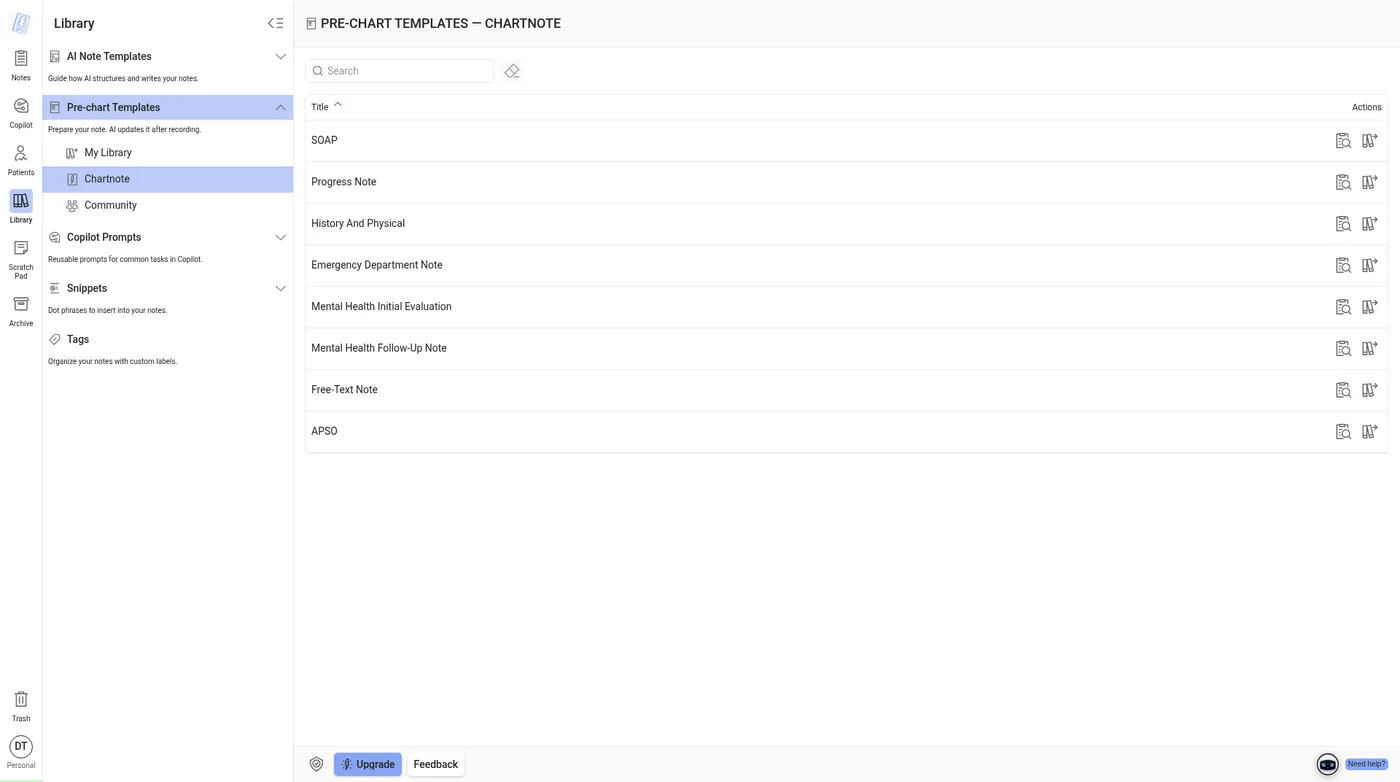
When you’re pulled out mid-visit, click Finish later and come back to the same encounter. Prechart is a separate step, used to prepare a note before the visit. On Home, Prepare before your visit is a template picker. In the Library, Pre-chart Templates is a list, not an editing screen: SOAP, Progress Note, History And Physical, Emergency Department Note, Mental Health Initial Evaluation, Mental Health Follow-Up Note, Free-Text Note, and APSO. The Library describes that list as “Prepare your note. AI updates it after recording.”
Features that matter most in urgent care
Not every AI scribe is built for high volume. Here’s what to look for, and how Chartnote handles each.
No note caps that run out mid-month
Urgent care clinicians can see dozens of patients per shift. A plan capped at 40 or 100 notes a month won’t last. Look for an unlimited tier, and read the fair-use policy.
Chartnote’s Max plan includes unlimited AI Scribe notes under our fair use policy, which explicitly welcomes high-volume clinicians like urgent care and hospitalists. If we ever see unusual usage, we reach out first, give at least a week to respond, and never interrupt active patient care. See current plans at chartnote.com/plans.
Fast, mobile capture
You’re moving between rooms, so your phone should be your microphone. Chartnote works on the web, iOS, and Android, plus a Chrome extension that sits alongside web-based EHRs.
Short, decision-focused templates
Urgent care notes should be tight: chief complaint, focused HPI, pertinent exam, decision-making, plan, and return precautions. Custom AI templates let you set sections, style (concise, bullets, or narrative), and specialty context. See SOAP note examples for urgent care and 9 other specialties.
Snippets for the things you say all day
Return precautions, wound care instructions, work notes. Snippets (dot phrases) drop in standard text instantly so you’re not dictating it for the 15th time.
Coding suggestions and after-visit summaries
Chartnote suggests ICD-10, CPT, and E/M codes based on the note. E/M levels for office visits are selected based on medical decision making or total time, so a well-documented MDM section matters. Suggestions are a starting point; final coding is yours. Chartnote can also generate after-visit summaries in plain language for patients.
Help from your MAs
Your medical assistants already hear the story first. With Chartnote Teams, every clinician subscription includes one Assistant Seat at no extra cost. Assistants record intake and hand it to the clinician, and the clinician creates and signs the note.
Answers without leaving the chart
Urgent care brings everything. Chartnote’s Copilot can answer clinical questions with PubMed-cited sources, and draft referrals or patient letters, right next to your note. Read more in The AI Scribe That Also Answers Your Clinical Questions.
Running a busy urgent care? Book a demo and we’ll show you the between-patients workflow on a sample encounter.
What it looks like in practice
Elochukwu Osoego, a physician assistant who works in emergency medicine and runs Innovative Medical Clinic in Jefferson City, Missouri, told us his AI scribe changed how he spends time with patients: “It’s cut my charting time to more than half, and I was already fast to start with.” Read his full story.
Rolling out an AI scribe across an urgent care clinic
If you manage a clinic or a small group, a few steps make rollout smoother:
- Start with a champion. Pick one or two clinicians who like new tools, and let them refine templates for a week.
- Standardize templates. Shared templates and snippets keep notes consistent across providers. Chartnote Team plans include shared templates, snippets, and admin tools.
- Set your consent approach. Decide how patients are told about AI-assisted documentation. Check state recording-consent rules with your compliance advisor.
- Confirm your BAA and retention settings. Every Chartnote account is covered by our BAA, and teams can set data retention centrally. Our HIPAA questions guide covers what to ask any vendor.
- Measure before and after. Track open charts at end of shift and time to close notes for two weeks before and after rollout.
Common pitfalls to avoid
- Skipping review. AI drafts are drafts. Check for anything the scribe got wrong or included that didn’t happen.
- Not saying the exam. Silent exams produce thin objective sections.
- One template for everything. A laceration repair needs a procedure section; a URI doesn’t.
- Batching to the end of shift anyway. The biggest win comes from closing each note right after the visit.
FAQ
Can an AI scribe keep up with urgent care volume?
Yes, if the plan doesn’t cap notes too low. Look for unlimited notes and a clear fair-use policy. Chartnote’s fair use policy explicitly welcomes high-volume settings like urgent care.
Do I need to tell patients I’m using an AI scribe?
Many clinics do as a matter of policy, and some states have recording-consent laws. Check your state’s rules and your clinic’s consent policy.
Does an AI scribe work with my urgent care EHR?
Chartnote is EHR-agnostic. You can transfer notes into any web-based EHR, and our Chrome extension sits alongside web-based EHRs.
Can my medical assistants use it too?
Yes. On Chartnote Teams, each clinician subscription includes one Assistant Seat. Assistants can record intake and hand it off, while clinicians create and sign the notes.
Will an AI scribe code my visits?
Chartnote suggests ICD-10, CPT, and E/M codes based on the note, but the clinician makes the final coding decision.
Leave on time tonight
You can’t control how many patients walk in. You can control whether their charts follow you home. Try Chartnote free on your next shift, or book a demo to set it up for your whole clinic.