How to Choose an AI Scribe: A 12-Point Checklist for Private Practices
On this page
- Why a structured evaluation matters
- The 12-point AI scribe checklist at a glance
- 1. Note accuracy
- 2. Specialty fit
- 3. EHR integration
- 4. Templates and customization
- 5. HIPAA compliance and the BAA
- 6. Data retention and AI model training
- 7. Pricing and contract terms
- 8. Support
- 9. Onboarding
- 10. Mobile and device options
- 11. Languages
- 12. A real free trial
- A simple scorecard for your trial
- How Chartnote measures up on this checklist
- FAQ
- What is the most important factor when choosing an AI scribe?
- Do I need an AI scribe that integrates directly with my EHR?
- How long should an AI scribe trial last?
- Can I use a free AI scribe plan with real patients?
- Should every clinician in a group use the same AI scribe?
- Put Chartnote to the test
Every AI scribe demo looks good. The note appears in seconds, the formatting is clean, and the salesperson’s sample visit goes perfectly.
Your real clinic is messier. Patients interrupt, bring up three problems at once, switch languages, or mention the important thing on the way out the door. The scribe you pick has to handle that, fit your EHR, satisfy your compliance obligations, and make financial sense for a small practice.
This checklist gives you 12 concrete things to evaluate, what to ask, and what a good answer looks like. Use it to compare two or three tools side by side, then run a real trial before you commit.
Why a structured evaluation matters
AI scribes can make a real dent in documentation time. In a 2025 JAMA Network Open study of 263 ambulatory clinicians across six health systems, the share reporting burnout fell from 51.9% to 38.8% after 30 days of ambient AI scribe use.
But results depend on fit. A tool that’s great for primary care may struggle with a podiatry exam or a therapy session. A structured checklist keeps you focused on how the tool performs in your practice, not in the demo.
The 12-point AI scribe checklist at a glance
| # | Criterion | The key question |
|---|---|---|
| 1 | Note accuracy | Does it capture what happened, without adding what didn’t? |
| 2 | Specialty fit | Does it understand your exams, terms, and note structure? |
| 3 | EHR integration | How does the note get into your EHR, and how many clicks? |
| 4 | Templates and customization | Can you make notes look the way you write them? |
| 5 | HIPAA and BAA | Is a BAA in place for every account you’ll use with PHI? |
| 6 | Data retention and AI training | How long is audio and text kept, and is PHI used for training? |
| 7 | Pricing and contract terms | What will you really pay at your volume? |
| 8 | Support | Who helps when something breaks mid-clinic? |
| 9 | Onboarding | How fast can a clinician produce a usable note? |
| 10 | Mobile and device options | Does it work on the devices you actually use? |
| 11 | Languages | Can it handle the languages your patients speak? |
| 12 | Free trial | Can you test it on real visits before paying? |
Now the details.
1. Note accuracy
Accuracy is the whole job. An AI scribe drafts a note; you sign it. The AMA describes ambient AI scribes as tools that capture the conversation and produce drafts that physicians edit for accuracy. That review step is yours, so you want drafts that need light edits, not rewrites.
What to test:
- Omissions. Did it miss a symptom, a medication change, or a return precaution you gave?
- Additions. Did it document an exam finding or counseling you didn’t do? This is the more serious error.
- Attribution. Does it correctly separate what the patient reported from what you found?
- Assessment and plan quality. Is it a clinical A&P, or just a summary of the conversation?
Good sign: you can review and sign most notes in a minute or two with small edits.
2. Specialty fit
General-purpose scribes are trained on lots of primary care. If you practice podiatry, PT, psychiatry, dermatology, or orthopedics, check that the tool knows your vocabulary and structure.
Ask:
- Do you have templates built for my specialty?
- Can it handle procedure notes, not just office visits?
- How does it handle sensitive content in behavioral health sessions?
Good sign: a sample note in your specialty reads like a colleague wrote it. For examples of what specialty notes can look like, see our AI SOAP note examples for 10 specialties.
3. EHR integration
This is where many evaluations go wrong. “Integrates with your EHR” can mean anything from copy-and-paste to a full bidirectional connection.
The common levels:
- Copy and paste. Works anywhere. Slowest.
- Browser extension. Inserts the note into a web-based EHR from the browser. Fast to set up, no IT project.
- Native or API integration. Notes and data flow directly into specific EHR fields. Often enterprise-only, with a longer setup.
Ask:
- Which EHRs do you support, and at what level?
- How many clicks from “note done” to “note in chart”?
- Is integration included in my plan or extra?
Good sign: the vendor shows you the workflow in your EHR, not a generic one.
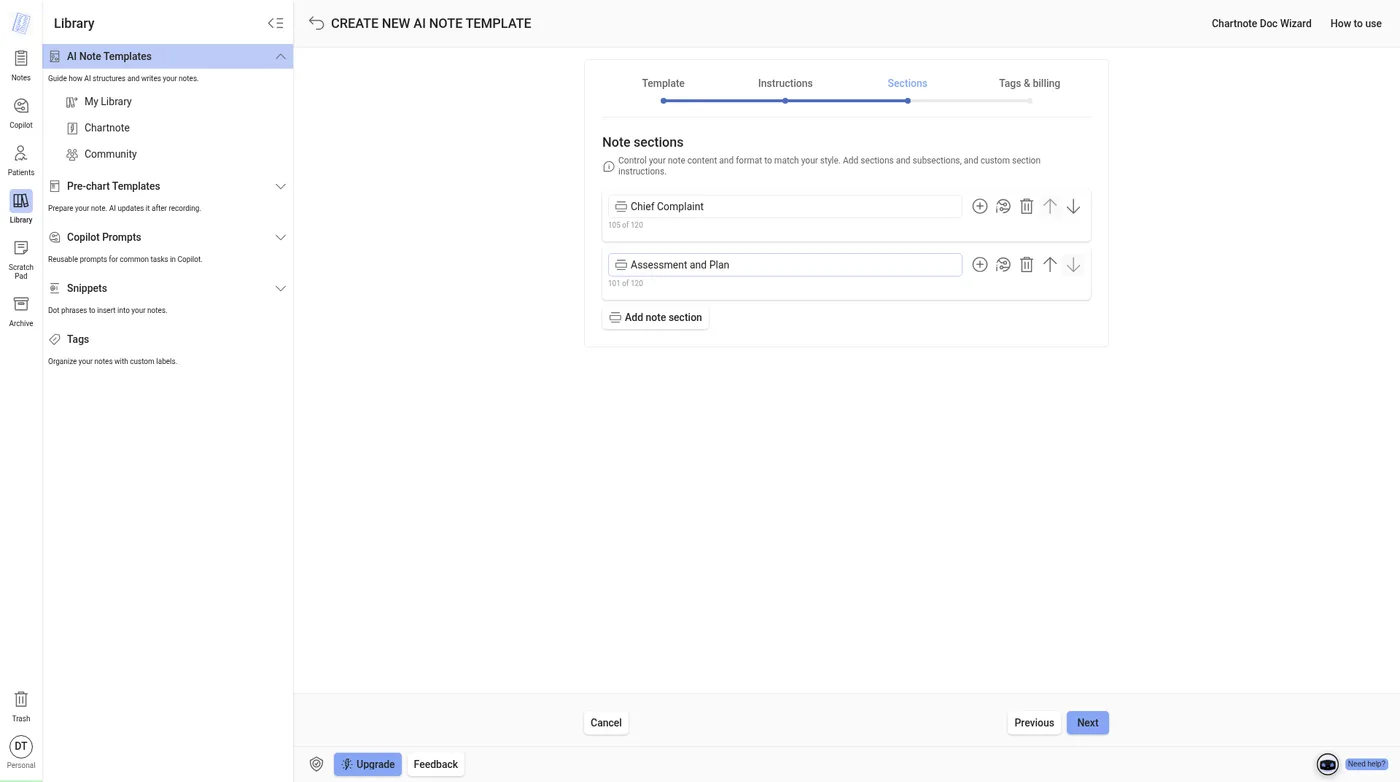
4. Templates and customization
Your notes have a style. Some clinicians want narrative HPIs; others want bullets. Some want a systems-based assessment; others want a problem list.
Look for:
- Custom sections and subsections
- Control over tone and format (narrative, concise, bullets)
- Preferred abbreviations and terminology
- Reusable phrases or snippets for things you say every day
Good sign: you can build a template once and every future note follows it. (Chartnote’s approach is explained in Custom AI Note Templates.)
5. HIPAA compliance and the BAA
An AI scribe hears and stores protected health information, so the vendor is a business associate. Under HIPAA, you need a business associate agreement in place before PHI flows through the tool.
Ask:
- Is a BAA included on every plan, including free and trial accounts?
- Do you have an independent security audit, such as a SOC 2 Type II report?
- Who are your subprocessors (cloud hosts, AI model providers), and are they under BAAs too?
Good sign: the vendor answers these quickly and in writing, and publishes a trust center. For the full list of questions, read Is Your AI Scribe HIPAA Compliant? 8 Questions to Ask.
6. Data retention and AI model training
Two separate questions, both important:
- How long are recordings and notes kept? Shorter retention means less exposure if something goes wrong. Ideally you can set it yourself.
- Is your patients’ data used to train AI models? You want a clear “no,” written into the vendor’s policies.
Ask:
- Are audio recordings stored? For how long? Can I delete them?
- Can I set automatic deletion for notes?
- Is PHI used to train your models or your AI providers’ models?
Good sign: configurable retention and a plain-language “never used for training” statement.
7. Pricing and contract terms
Pricing ranges widely, from free tiers to enterprise quotes. Compare on your real volume, not the headline price.
Ask:
- What’s included at each tier (coding suggestions, dictation, templates, copilot features)?
- Are there note caps, and what happens when I hit them?
- Is “unlimited” subject to a fair-use policy?
- Month-to-month or annual? Any implementation fees?
Good sign: prices are published, and you can cancel without a long lock-in. See our breakdown of AI medical scribe pricing in 2026.
8. Support
When the scribe misbehaves at 10:40 a.m. with a full waiting room, you need help fast.
Ask:
- What support channels are available (chat, ticket, phone)?
- What are typical response times?
- Is priority or dedicated support available, and on which plan?
Good sign: you can reach a person who knows clinical workflows, not just a help article.
9. Onboarding
Small practices don’t have an IT department to run a three-month rollout.
Ask:
- How long until a new clinician produces a usable note?
- Is there live onboarding or training?
- For groups, can templates be shared across the team?
Good sign: a clinician can sign up, record a visit, and have a usable draft the same day.
Want to see this checklist applied to Chartnote? Book a demo and we’ll walk through each point using your specialty and your EHR.
10. Mobile and device options
Think about where you actually document: exam room, hallway, home visit, telehealth.
Ask:
- Is there an iOS and Android app?
- Does it work in the browser, alongside my EHR?
- Can I use my phone as the microphone while the note comes together on my computer?
- Does it handle telehealth visits?
Good sign: the same account and templates work across every device you use.
11. Languages
If you see patients in Spanish, Vietnamese, Mandarin, or any other language, test it.
Ask:
- Which languages can it transcribe?
- Can it produce an English note from a visit conducted in another language?
- How does it handle visits that switch languages mid-conversation, or visits with an interpreter?
Good sign: you test a real (or role-played) multilingual visit, and the note is accurate.
12. A real free trial
No checklist replaces using the tool on your own patients.
How to run a fair trial:
- Pick 2 or 3 tools max. More than that and you won’t give any of them a fair shot.
- Use each for at least a week of normal clinic days.
- Include your hardest visits: multiple complaints, procedures, sensitive topics.
- Track three things: time to signed note, number of edits, and after-hours charting.
- Confirm the BAA is in place before using real patient information.
Good sign: at the end of the week, you’re finishing more notes before you leave the clinic.
A simple scorecard for your trial
Score each tool from 1 (poor) to 5 (excellent) on each criterion. Weight the ones that matter most to your practice.
| Criterion | Weight (1–3) | Tool A | Tool B | Tool C |
|---|---|---|---|---|
| Note accuracy | 3 | |||
| Specialty fit | 3 | |||
| EHR integration | 2 | |||
| Templates | 2 | |||
| HIPAA and BAA | 3 | |||
| Retention and training | 2 | |||
| Pricing | 2 | |||
| Support | 1 | |||
| Onboarding | 1 | |||
| Mobile | 1 | |||
| Languages | 1 | |||
| Trial experience | 1 |
How Chartnote measures up on this checklist
We built Chartnote for clinicians in exactly this situation. Here’s how it maps to the checklist, based on what’s published on chartnote.com and our Privacy and Security overview:
- Accuracy and review: AI Scribe drafts a structured SOAP note with an assessment and plan, not a generic summary. AI output is always reviewed and approved by the clinician before use.
- Specialty fit and templates: specialty-aware clinical context, custom AI templates with sections and nested subsections, style control (narrative, concise, or bullet-point), documentation preferences such as abbreviations, plus snippets for dot phrases. More than 1,000 templates are preloaded, with access to a community library.
- EHR workflow: notes transfer into any web-based EHR, and the Chrome extension lets you dictate and insert notes directly in your browser-based EHR. No integration project.
- HIPAA and BAA: every Chartnote account, including free and trial accounts, is covered by our BAA from first use. Chartnote is SOC 2 Type II audited, and that audit covers the whole platform on every plan.
- Retention and training: recordings and notes can be set to delete automatically after 1 to 30 days, and patient information is never used to train AI models.
- Pricing: a free Basic plan with 15 AI Scribe notes a month, and published paid plans. See chartnote.com/plans.
- Support and onboarding: chat and ticket support on every plan, priority support on paid plans, and up to two 1:1 expert sessions on Max. Teams get dedicated onboarding.
- Mobile: web app, iOS and Android apps, and the Chrome extension. You can also sync your phone to a computer and use it as a microphone.
- Languages: support for 50+ languages.
- Beyond the scribe: billing and coding suggestions (ICD-10, CPT, E/M), after-visit summaries, live dictation, and Copilot for PubMed-cited answers to clinical questions inside the note.
FAQ
What is the most important factor when choosing an AI scribe?
Note accuracy in your specialty. A tool that saves time but needs heavy edits, or adds findings you didn’t document, creates more work and more risk. Test it on your own visits.
Do I need an AI scribe that integrates directly with my EHR?
Not necessarily. Many small practices do well with a browser extension that inserts notes into a web-based EHR. Deep integration matters more for larger groups and is often priced at the enterprise level.
How long should an AI scribe trial last?
At least a week of normal clinic days for each tool, including your hardest visit types. Track time to signed note and after-hours charting before and during the trial.
Can I use a free AI scribe plan with real patients?
Only if the vendor has a BAA in place that covers that plan. Some vendors cover free and trial accounts; others don’t. Confirm in writing first.
Should every clinician in a group use the same AI scribe?
It’s usually easier for templates, billing, and compliance. Many vendors offer team plans with shared templates and centralized administration.
Put Chartnote to the test
The best way to use this checklist is with a real tool on real visits. Start free with 15 AI Scribe notes a month at chartnote.com/welcome, no credit card required.
Choosing for a practice or group? Book a demo and we’ll go through the checklist with you.